In WebTextEditor, user can insert a table using two options:
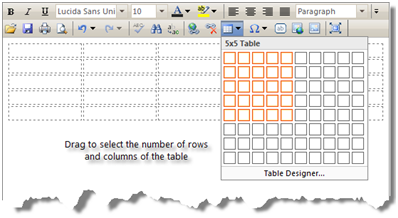
- Table pop up.
Using table pop up, user can drag to select the number of rows and columns of the table. Table will be inserted with 100% width size.
- Table Designer Task Pane
Using Table Designer Task Pane, user can choose from a list of table layout template available or input the table dimensions and format before inserting the table into editor.
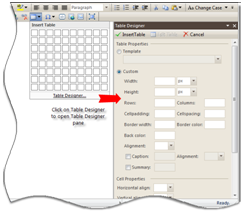
There are three modes in Table Designer pane: Insert Table, Edit Table, and Cell Actions. In Insert Table mode, user can choose a table template from a list available or input table dimensions and formatting. In this mode, user can also specifies cell dimensions and formatting that will be applied to all cells in the table.
Edit Table mode has the same layout as Insert Table mode, however user is not allowed to modify the number of rows and columns in the table to avoid loss of content if the rows and columns are reduced. User also cannot modify cell properties.
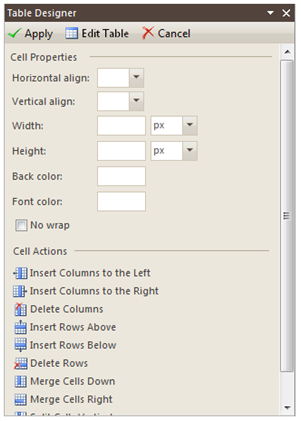
In Cell Actions mode, user can modify cell properties and perform cell actions, such as insert columns to the left, insert columns to the right, delete columns, insert rows above, insert rows below, delete rows, merge cells down, merge cells right, split cells vertical and split cells horizontal. These actions are also available in editor context menu when table is selected.
Not all browsers support table selection, thus navigating to Edit Table mode could be a little bit difficult. In this case, user can utilize Edit Table command in pane toolbar to activate Edit Table mode.